This guide gives a summary of the content contribution process. Here are some specific points which will make your entries hassle-free.
Categories
First of all, all articles will be categorized as shown below. You are at liberty use more than one category if both categories apply to your posting. Every posting should be assigned at least one category. If you have a entry which qualifies for a category not listed below, please email us and we will include it.

|
ID |
Category |
|
3 |
Latest |
|
4 |
News and Articles |
|
5 |
Discussions |
|
6 |
Press Releases |
|
7 |
Infrastructure |
|
8 |
Career |
|
9 |
Ethics |
|
10 |
Lifestyle |
|
11 |
Finance |
|
13 |
Videos |
Excerpt
The excerpt is a brief abstract of what your article is all about. The use this excerpt in several sections of the website where your article will appear and it is also submitted to search engines. Please be as concise as possible.
Tag
Tagging allows us to give our readers access to other entries related to your posting. Check the most popular tags used before creating a new tag to see if there is one that you can use.
Embedding Video
When you want to post a video, get the url for the embed code.
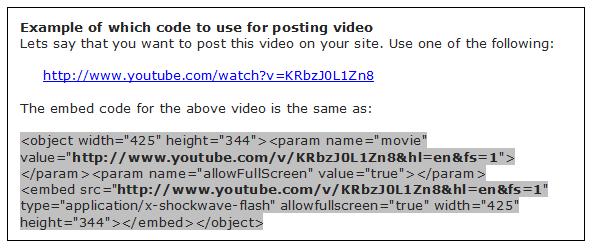
Notice the urls written bold in embed code. These urls are the same and are used as embed code for videos. Using either one of them is up to you. To implement it, go to Write > Post in your Admin Area, scroll down the page until until you see the Custom fields. Type video as the name and paste the url (from embed code) as the value. Click on Add Custom Field, and publish your video.
Photos
We encourage you to use photos in within your articles.
Follow these steps to adding photo to your articles,
- Log in to admin area
- Open a Write New Post window and paste/write your article
- Upload your photo with media uploader feature, select the applicable parameters and insert picture into the document. Note: your uploaded photo will be auto resized on the fly for the main page thumbnail, for the category image, and the single post page.
- Close the upload window
- Publish the post under the Photo Gallery category